Table of Contents
Deploying on-premises GPU servers can give businesses, AI teams, research labs, and developers more control over compute resources, data, networking, and workload scheduling. But when you move from one GPU server to two, the setup becomes more than simply installing two machines and connecting them to a switch.
You need to plan GPU capacity, CPU and RAM, storage, networking, power, cooling, operating systems, GPU drivers, containerization, monitoring, and workload scheduling. A well-designed two-server environment can support AI training, inference, machine learning, computer vision, LLM development, and other GPU-intensive workloads without depending entirely on public cloud infrastructure.
This guide explains how to deploy two on-premises GPU servers, how to connect them, what hardware to consider, and how to choose the right GPU servers for your workload.
What Are On-Premises GPU Servers?
On-premises GPU servers are physical servers equipped with one or more GPUs and deployed inside an organization’s own data center, server room, laboratory, or other controlled environment.
Unlike cloud GPU instances, the organization owns or directly manages the physical infrastructure.
A typical GPU server may include:
- NVIDIA or AMD GPUs
- Multi-core server CPUs
- Large amounts of ECC RAM
- NVMe or enterprise SSD storage
- High-speed Ethernet or InfiniBand networking
- Redundant power supplies
- Rack-mount chassis
- Dedicated cooling
- Remote server management
For example, a two-server setup could contain:
- Server 1: 4 GPUs + 256 GB RAM
- Server 2: 4 GPUs + 256 GB RAM
- High-speed network: 100 GbE or another suitable interconnect
- Shared or distributed storage: NVMe-based storage system
The exact configuration depends on whether you need independent servers or want them to operate as a coordinated GPU cluster.

How Do You Deploy Two On-Premises GPU Servers?
The deployment process has eight practical stages.
1. Define the AI Workload
Before you buy server hardware, identify what you want to run.
Common workloads include:
- Large language model training
- Fine-tuning
- Generative AI
- Computer vision
- Natural language processing
- Scientific computing
- AI inference
- Machine learning experimentation
- GPU-accelerated analytics
The workload determines the GPU memory, GPU count, CPU, RAM, storage, and network requirements.
For example, an inference server may prioritize GPU memory and uptime, while distributed AI training may require multiple GPUs and high-speed networking.
2. Select the GPU Configuration
Next, determine how many GPUs each server needs.
You could deploy:
Deployment | Example Configuration | Suitable For |
Entry-level | 1–2 GPUs/server | Development and inference |
Mid-range | 2–4 GPUs/server | AI/ML and computer vision |
High-performance | 4–8 GPUs/server | Training and demanding workloads |
Cluster | Multiple multi-GPU servers | Distributed AI workloads |
A multi-GPU server can be useful when several GPUs need to work together inside the same machine.
However, two separate servers provide additional flexibility. You can dedicate one server to training and the other to inference, development, testing, or production workloads.
What is the Best GPU Server for AI Training?
There is no single configuration that is the best GPU server for AI training for all organizations.
The right choice depends on model size, dataset size, GPU memory requirements, training framework, network bandwidth, and budget.
For AI training, look for:
High GPU Memory
GPU memory is one of the most important factors for AI workloads.
Large models can require substantial VRAM. If a model or training workload does not fit efficiently into available GPU memory, you may need model parallelism, distributed training, quantization, or a different hardware configuration.
Multiple GPUs
A multi-GPU configuration can accelerate workloads that support parallel processing.
For example:
Server A → 4 GPUs
Server B → 4 GPUs
This gives you eight GPUs across the environment, although the total usable performance depends on the workload and software architecture.
Strong CPU and ECC RAM
The CPU feeds data to GPUs and handles tasks such as preprocessing, orchestration, storage operations, and system management.
ECC memory is also valuable for workloads where data integrity and system stability matter.
High-Speed Networking
When workloads are distributed between two servers, network performance becomes critical.
A slow network can create communication bottlenecks during distributed training.

What's the Best GPU Server for AI Workloads?
The best GPU server for AI workloads depends on the specific application rather than the server brand alone.
For demanding AI workloads, evaluate these factors:
- GPU model and VRAM
- Number of GPUs
- GPU-to-GPU communication capability
- CPU performance
- System RAM
- NVMe storage
- Network bandwidth
- Power requirements
- Cooling capacity
- Remote management
- Warranty and support
- Expansion capability
For example, a research team training large models may prioritize high-memory GPUs and high-speed interconnects. A company running AI may instead prioritize GPU availability, reliability, storage, & predictable operating costs.
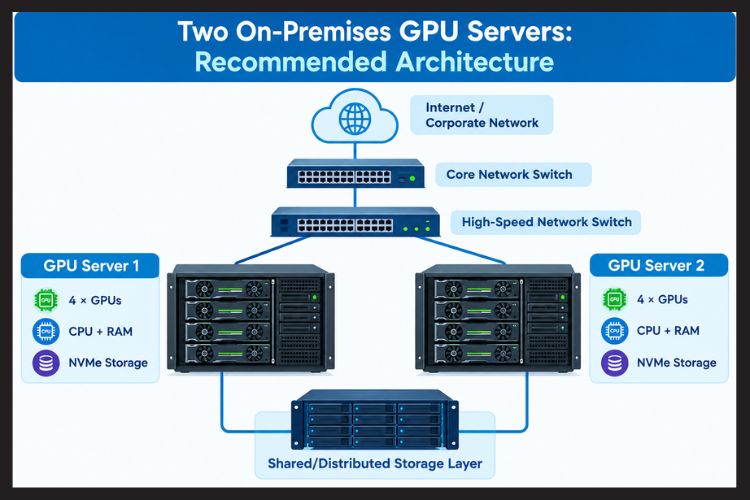
Two On-Premises GPU Servers: Recommended Architecture
Each server can operate independently, while the high-speed network allows them to participate in distributed workloads.
Server 1: Training Node
Use the first server primarily for:
- Model training
- Fine-tuning
- Dataset preprocessing
- Experimentation
Server 2: Inference and Development Node
The second server can support:
- AI inference
- Application development
- Model testing
- Staging
- Backup workloads
Alternatively, both servers can be configured as compute nodes in the same cluster.
How to Connect Two GPU Servers?
After installing the hardware, connect both servers to your network infrastructure.
A basic setup requires:
- Management network connection
- High-speed data network
- Network switch
- Appropriate transceivers/cables
- IP addresses
- DNS/hostname configuration
For distributed AI training, consider a high-bandwidth, low-latency network.
The networking technology should match the GPUs, workload, distance between servers, and budget. Simply having powerful GPUs does not guarantee fast distributed training if the servers communicate slowly.
Software Stack for Two GPU Servers
Once the physical infrastructure is ready, install and configure the software stack.
Operating System
Linux is widely used for AI and GPU computing environments.
Ubuntu Server and other enterprise Linux distributions are commonly used, depending on organizational requirements and vendor support.
GPU Drivers
Install the correct GPU drivers for the selected hardware.
Then verify GPU detection with the appropriate vendor tools.
For NVIDIA environments, administrators commonly use tools such as:
nvidia-smi
This helps verify:
- GPU detection
- GPU memory
- Driver version
- Temperature
- Utilization
- Power usage
CUDA and AI Frameworks
For NVIDIA-based systems, configure the required CUDA environment and compatible versions of frameworks such as:
- PyTorch
- TensorFlow
- JAX
- RAPIDS
- Other GPU-accelerated software
Always check framework and driver compatibility before deploying to production.
Use Containers for Reproducible AI Environments
Containers can make it easier to maintain two GPU servers.
For example, you can package:
- Python
- CUDA libraries
- PyTorch
- AI libraries
- Application dependencies
into a consistent environment.
This reduces the risk of Server 1 running a different software stack from Server 2.
For larger environments, container orchestration can also help schedule workloads across available compute nodes.
How to Build an On-Prem GPU Cluster?
If your goal is to make the two servers function as a coordinated computing environment, configure them as a small GPU cluster.
Step 1: Give Each Server a Unique Hostname
For example:
gpu-node-01
gpu-node-02
Step 2: Configure Networking
Ensure both servers can communicate reliably using their private network addresses.
Test connectivity using tools such as:
ping gpu-node-02
Step 3: Synchronize Software
Keep the following consistent:
- GPU drivers
- CUDA versions
- AI frameworks
- Container runtime
- Python environment
- Configuration files
Step 4: Configure Workload Management
Depending on your environment, you can use a scheduler or orchestration system to allocate GPU resources.
A cluster can then assign jobs based on:
- GPU availability
- GPU memory
- CPU requirements
- RAM requirements
- Priority
- Queue configuration
Step 5: Test Distributed Training
Start with a small workload before running a large model.
Measure:
- GPU utilization
- Network throughput
- Training time
- GPU-to-GPU communication
- CPU utilization
- Storage performance
This helps identify bottlenecks before production use.
What Would You Deploy First: Two On-Premises GPU Servers?
For a new deployment, start with a repeatable two-node design rather than purchasing the most powerful hardware available.
A practical sequence is:
- Define workloads.
- Select GPU memory requirements.
- Choose the number of GPUs per node.
- Select CPU and RAM.
- Choose NVMe storage.
- Design the network.
- Calculate power and cooling.
- Install the operating system.
- Install GPU drivers and required frameworks.
- Configure containers and cluster management.
- Benchmark both nodes.
- Move production workloads after testing.
This approach reduces the risk of building an expensive system that does not match your actual workload.
What are the Benefits of Deploying Two On-Premises GPU Servers?
1. Greater Control
You control the physical infrastructure, operating environment, network, and access policies.
2. Predictable Infrastructure
Once deployed, you have dedicated hardware available for your workloads.
3. Data Control
Sensitive datasets and models can remain within your own infrastructure, subject to your security and compliance design.
4. Flexible Workload Allocation
One server can run training while another handles inference or development.
5. Expandability
You can design the initial environment so additional GPU nodes can be added later.
6. Reduced Dependency on Cloud Capacity
For organizations with sustained GPU workloads, owning infrastructure can provide an alternative to renting GPU capacity continuously.
However, on-premises infrastructure also requires investment in power, cooling, hardware maintenance, networking, software administration, and physical space.
Can You Build a GPU Server at Home With NVIDIA H100 or A100 Cards?
Technically, a high-end GPU server can be deployed in a non-data-center environment, but powerful enterprise GPUs introduce practical challenges.
You need to consider:
- Power delivery
- Cooling
- Noise
- Physical space
- Chassis compatibility
- GPU dimensions
- CPU and motherboard compatibility
- PCIe lanes
- Power supply capacity
- Electrical infrastructure
- Network connectivity
High-end GPUs can generate significant heat and require appropriate server-level cooling.
For most home users, a professional workstation or lower-power GPU system may be more practical than attempting to recreate a data-center server environment.
For businesses, research labs, and AI teams, a properly designed rack server is generally easier to manage in a controlled server room.
What is a Server Rack?
A server rack is a standardized frame or enclosure used to install networking equipment, servers, storage systems, and related hardware.
Rack servers are commonly measured in rack units:
- 1U: 1.75 inches high
- 2U: 3.5 inches high
- 4U: 7 inches high
GPU servers often require more physical space because GPUs, power supplies, cooling systems, and expansion hardware can be larger than standard server components.
When planning two GPU servers, check:
- Rack depth
- Rack width
- Available rack units
- Power distribution
- Cooling airflow
- Cable management
- Weight capacity
Features to Look for When You Buy Server Hardware
Before you buy server hardware for AI workloads, create a technical checklist.
GPU
Check:
- GPU model
- VRAM
- Number of GPUs
- Power consumption
- Supported software
- GPU interconnect options
CPU
Consider:
- Core count
- PCIe lanes
- Memory bandwidth
- CPU performance
- Compatibility with your GPU configuration
RAM
AI servers may require substantial system memory.
Consider ECC RAM and sufficient capacity for your datasets, preprocessing, applications, and workloads.
Storage
NVMe SSDs can provide high performance for:
- Training datasets
- Model checkpoints
- Containers
- Temporary processing
- Logs
Network
For two-node AI clusters, network bandwidth can have a major effect on distributed workloads.
Power and Cooling
Never treat power and cooling as an afterthought.
Calculate the expected power draw of:
- GPUs
- CPUs
- RAM
- Storage
- Fans
- Motherboard
- Network cards
Then design appropriate power and cooling capacity.
How Much Does a GPU Server Cost in India?
The GPU server price in India varies substantially based on the GPU model, GPU count, CPU, RAM, storage, chassis, networking, warranty, and configuration.
A basic GPU server can cost far less than a high-end multi-GPU AI server, while enterprise systems with multiple high-memory GPUs can reach several lakhs or more.
Instead of comparing only the purchase price, calculate the total cost of ownership (TCO).
Include:
- Server hardware
- GPUs
- Network equipment
- Rack
- UPS/PDU
- Electricity
- Cooling
- Storage
- Maintenance
- Warranty/support
- Software
- Replacement components
For an accurate configuration and current pricing, businesses should request a workload-based quotation rather than selecting hardware based solely on a generic price range.
Practical Example: Two-Node AI Environment
Imagine an AI development team needs:
- 8 GPUs total
- 4 GPUs per server
- Large system memory
- Fast NVMe storage
- High-speed networking
- Linux
- Containerized workloads
A possible architecture is:
Node 1
- 4 GPUs
- High-core-count CPU
- 256 GB ECC RAM
- NVMe storage
Node 2
- 4 GPUs
- High-core-count CPU
- 256 GB ECC RAM
- NVMe storage
Infrastructure
- High-speed network switch
- Rack
- UPS/PDU
- Appropriate cooling
- Centralized monitoring
The team could use the nodes independently or configure them for distributed workloads.
The important point is that the architecture should be designed around the AI workload—not simply around the number of GPUs.
Common Mistakes When Deploying Two GPU Servers
Buying GPUs Before Checking Compatibility
A GPU may not fit physically or electrically into the selected server.
Underestimating Power
High-performance GPU servers can consume significant power.
Using a Slow Network
Distributed workloads can become network-bound even when GPU utilization is high on individual nodes.
Mixing Software Versions
Different driver or CUDA versions can create avoidable compatibility problems.
Ignoring Cooling
GPU performance can suffer when thermal limits are reached.
Buying More Hardware Than You Need
Start with measurable workload requirements rather than specifications alone.
Not Monitoring the Environment
Monitor GPU utilization, temperature, power, memory, network traffic, storage performance, and job completion time.
Key Takeaways
- On-premises GPU servers provide direct control over physical AI infrastructure.
- Two servers can operate independently or form a small GPU cluster.
- GPU memory, GPU count, CPU, RAM, storage, networking, power, and cooling all matter.
- High-speed networking is particularly important for distributed AI training.
- Containers help maintain consistent software environments.
- A server rack must provide sufficient space, airflow, power, and weight capacity.
- The best GPU server depends on the workload rather than on a single universal specification.
- Before you buy server hardware, calculate technical requirements and total cost of ownership.
- The GPU server price in India varies significantly depending on the configuration.
- A two-node deployment is a useful starting point for organizations planning to expand their AI infrastructure.
Conclusion
Deploying two on-premises GPU servers is more than installing two powerful machines. A successful deployment combines the right GPUs with sufficient CPU, ECC memory, NVMe storage, high-speed networking, reliable power, cooling, compatible software, and effective workload management.
If your goal is AI training, inference, machine learning, computer vision or LLM development, start by defining the workload, then design the infrastructure around those requirements.
Whether you need a single-GPU server in India, a multi-GPU platform, or a two-node AI cluster, Serverstack can help you evaluate server configurations based on your performance, scalability and infrastructure requirements.
Looking to buy server hardware for AI, machine learning, or GPU-intensive workloads?
Explore GPU server configurations from Serverstack and discuss your requirements with a server specialist before purchasing. Choosing the right configuration upfront can help you avoid compatibility, performance, power, and scalability problems later.
Frequently Asked Questions
1. What would you deploy first, two on-premises GPU servers?
Start with the workload definition, GPU memory requirement, number of GPUs, CPU/RAM requirements, storage, network bandwidth, power, and cooling. Then build two identical or appropriately balanced nodes. Testing one node first can also help validate the hardware and software stack before deploying the second.
2. Is it possible to build a GPU server at home with NVIDIA H100 or A100 cards?
Yes, technically, but it requires careful planning for power, cooling, chassis compatibility, PCIe lanes, motherboard support, physical dimensions, and electrical infrastructure. High-end data-center GPUs are generally better suited to professionally designed server environments than typical home setups.
3. What guidance is needed to build a small-scale GPU server?
Start by identifying your AI workload and software framework. Then determine GPU VRAM, GPU count, CPU, ECC RAM, NVMe storage, networking, power, cooling, and chassis requirements. For a small deployment, prioritize expandability so you can add additional GPUs or nodes later.
4. How much does a GPU server cost in India?
The GPU server price in India depends heavily on the GPU model, number of GPUs, VRAM, CPU, RAM, storage, networking, chassis, warranty, and support. Entry-level configurations and enterprise multi-GPU systems can have very different prices, so request a configuration-specific quotation for an accurate figure.
5. How do you build an on-prem GPU cluster?
Install compatible GPU servers, connect them through a suitable high-speed network, configure consistent drivers and AI software, establish hostname/IP connectivity, install container or workload-management tools, and test distributed workloads. Monitor GPU, CPU, memory, storage, and network performance before moving production workloads to the cluster.
6. How many GPUs should an on-premises GPU server have?
There is no universal number. One or two GPUs may be sufficient for development or inference, while demanding AI training can require four, eight, or more GPUs. Select the GPU count according to model size, VRAM requirements, training strategy, and expected workload volume.
7. Are two GPU servers better than one multi-GPU server?
They serve different purposes. A multi-GPU server can provide strong intra-server GPU communication and simpler management for certain workloads. Two servers provide node-level flexibility, workload isolation, and a path toward cluster-based scaling. The appropriate design depends on the application.
8. What networking is needed between two GPU servers?
The requirement depends on the workload. Distributed AI training generally benefits from high-bandwidth, low-latency networking because servers exchange data and synchronization information during training. Choose the network based on GPU architecture, training framework, workload size, and budget.
9. What should I check before buying a GPU server in India?
Check GPU model and VRAM, GPU count, CPU, ECC RAM, NVMe storage, PCIe expansion, networking, power requirements, cooling, rack compatibility, warranty, support, and future expansion. Also verify that the complete configuration is compatible rather than evaluating the GPU alone.
10. What are the best servers for AI and machine learning?
The best servers for AI and machine learning depend on the workload. AI training often requires high-memory GPUs, multiple GPUs, strong CPU and memory bandwidth, fast storage, and high-speed networking. Inference workloads may prioritize GPU memory, reliability, power efficiency, and scalability.