Table of Contents
Artificial Intelligence (AI), machine learning, 3D rendering, video editing, and high-performance computing require powerful graphics processing capabilities. However, buying a separate high-end GPU workstation for every employee can be expensive and difficult to manage.
This is where a GPU server becomes a smart solution.
Instead of installing expensive GPUs on every computer, organizations can deploy one centralized GPU server and allow multiple users to access its computing power remotely. Whether you run an AI startup, architecture firm, engineering company, university lab, or video production house, sharing a GPU server across multiple computers helps reduce costs while improving productivity.
In this guide, you’ll learn how GPU server sharing works, its benefits, different deployment methods, performance considerations, and how to choose the best GPU server for your business.
What is a GPU Server?
A GPU server is a high-performance server equipped with one or more Graphics Processing Units (GPUs). Unlike traditional CPU-based servers, GPU servers process thousands of tasks simultaneously, making them best for:
- Artificial Intelligence (AI)
- Machine Learning (ML)
- Deep Learning
- Scientific Computing
- Data Analytics
- Video Rendering
- CAD & 3D Design
- Virtual Desktop Infrastructure (VDI)
Instead of running heavy workloads on individual desktops, all processing happens inside the server while users connect remotely.
Can One GPU Server Be Shared with Multiple Computers?
Yes, absolutely.
Modern GPU servers are specifically designed to support multiple users simultaneously.
Multiple computers can securely connect to a centralized GPU server over a local network (LAN), VPN, or the internet. Each user receives dedicated or shared GPU resources depending on the configuration.
This approach is widely used in:
- AI development companies
- Universities
- Animation studios
- Architecture firms
- Engineering organizations
- Healthcare imaging centers
- Cloud service providers
- Software development companies
How Does GPU Server Sharing Work?
A GPU server sits inside your office, data center, or cloud environment.
Users connect using:
- Remote Desktop
- Virtual Desktop Infrastructure (VDI)
- VMware
- Citrix
- Microsoft Remote Desktop Services
- NVIDIA Virtual GPU (vGPU)
- Linux SSH sessions
- Cloud portals
The server performs all GPU-intensive processing while users simply view the output on their computers.
Example
Suppose your company has:
- 20 Designers
- 10 AI Engineers
- 5 Video Editors
Instead of purchasing 35 expensive GPU workstations, you can install one powerful GPU server with multiple GPUs.
Each employee logs into the server from their own computer and accesses high-performance GPU resources whenever needed.
Ways to Share a GPU Server
1. Virtual GPU (vGPU)
Virtual GPU technology divides one physical GPU into multiple virtual GPUs.
Benefits include:
- Multiple users share one GPU
- Better hardware utilization
- Lower infrastructure costs
- Secure resource allocation
This method is popular in enterprise environments.
2. Virtual Desktop Infrastructure (VDI)
VDI provides every employee with a virtual desktop powered by the GPU server.
Employees can work from:
- Office desktops
- Home laptops
- Thin clients
- Remote branches
Applications run on the server rather than the local device.
3. GPU Pass-Through
GPU pass-through assigns one complete GPU directly to a virtual machine.
This method is best for:
- AI model training
- CAD software
- Video rendering
- Simulation workloads
It delivers near-native GPU performance.
4. Kubernetes GPU Sharing
AI companies frequently use Kubernetes to allocate GPU resources across multiple containers.
This approach improves scalability and simplifies resource management for cloud-native applications.
What are the Benefits of Sharing a GPU Server?
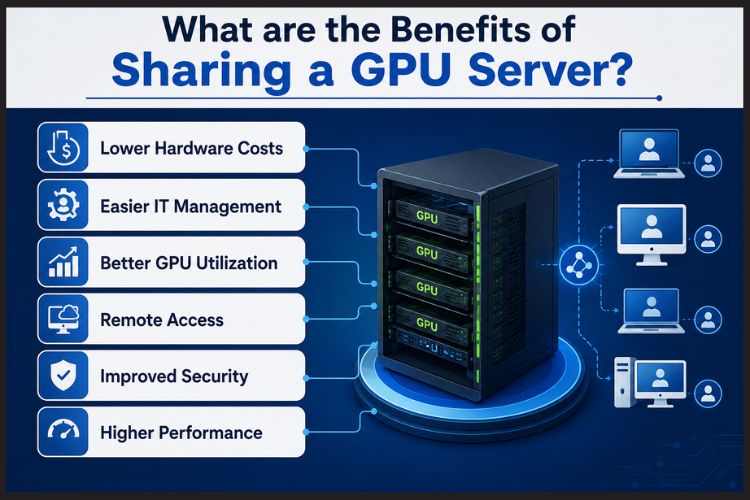
Lower Hardware Costs
Instead of buying expensive GPU workstations for every employee, businesses invest in one centralized GPU server.
This significantly reduces capital expenditure.
Easier IT Management
Software updates, drivers, security patches, and backups are managed from a single server.
IT teams spend less time maintaining individual machines.
Better GPU Utilization
Many desktop GPUs remain idle for long periods.
A centralized GPU server allows multiple users to utilize available GPU resources efficiently.
Remote Access
Employees can securely work from anywhere using:
- Laptop
- Desktop
- Thin client
- MacBook
No expensive workstation is required.
Improved Security
Since project files remain inside the server:
- Data theft risk decreases
- Backup becomes easier
- Compliance improves
- Sensitive AI models remain protected
Higher Performance
Enterprise GPU servers support:
- Multiple NVIDIA GPUs
- High-core-count processors
- Large RAM capacity
- NVMe SSD storage
- High-speed networking
This provides significantly better performance than individual workstations.
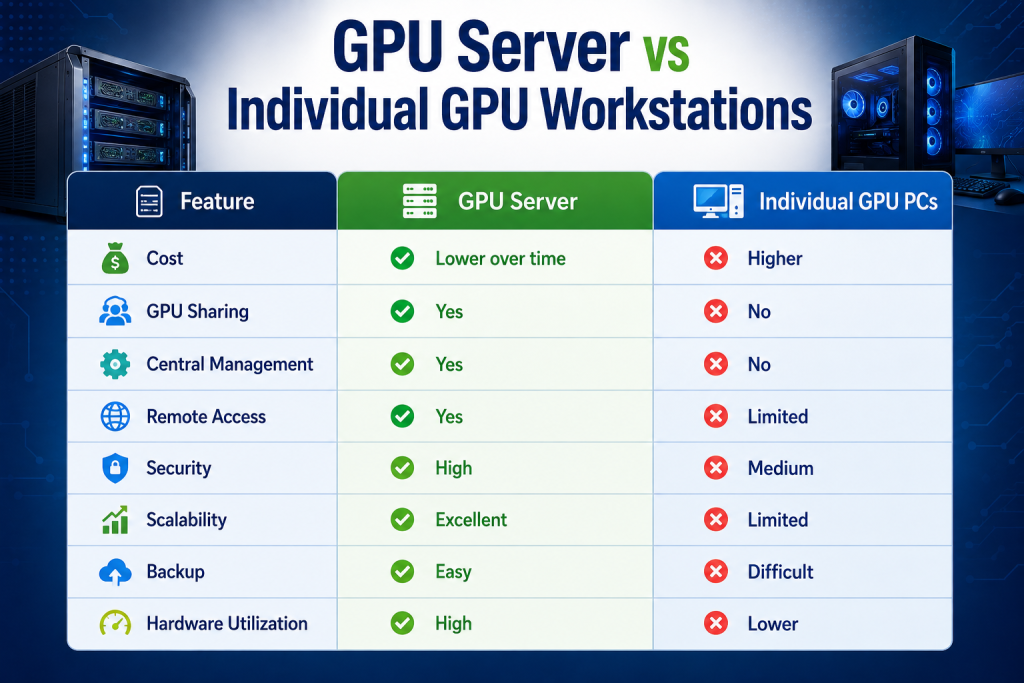
What is the GPU Server vs Individual GPU Workstations?
Industries That Benefit Most
A shared GPU server is useful for:
Artificial Intelligence
- Deep Learning
- LLM Training
- Computer Vision
- NLP
Architecture
- AutoCAD
- Revit
- BIM
- 3D Visualization
Media & Entertainment
- Adobe Premiere Pro
- Blender
- Maya
- DaVinci Resolve
Healthcare
- Medical Imaging
- MRI Analysis
- CT Scan Processing
Education
Universities use GPU servers for:
- AI Research
- Robotics
- Engineering Simulations
- Data Science Labs
What Hardware is Required?
A modern GPU server typically includes:
CPU
- Intel Xeon
- AMD EPYC
GPU
- NVIDIA RTX Series
- NVIDIA A100
- NVIDIA H100
- NVIDIA RTX PRO Series
Memory
- 128GB–2TB ECC RAM
Storage
- Enterprise NVMe SSDs
- RAID Storage
Network
- 10GbE
- 25GbE
- 40GbE
- 100GbE
Performance Tips for Shared GPU Servers
To achieve the best results:
- Use enterprise-grade GPUs.
- Install high-speed NVMe SSD storage.
- Allocate GPU resources based on workload.
- Monitor GPU usage regularly.
- Upgrade RAM for AI and virtualization tasks.
- Use fast networking to reduce latency.
- Implement proper cooling and power redundancy.
GPU Server Price in India
The GPU server price in India depends on several factors:
- GPU model
- Number of GPUs
- RAM capacity
- Processor type
- Storage configuration
- Networking requirements
Typical pricing ranges are:
Configuration | Approximate Price (India) |
Entry-Level GPU Server | ₹3 Lakhs–₹6 Lakhs |
Mid-Range AI GPU Server | ₹6 Lakhs–₹15 Lakhs |
Enterprise Multi-GPU Server | ₹15 Lakhs–₹60 Lakhs+ |
Prices vary depending on customization, GPU availability, and enterprise requirements.
How to Choose the Best GPU Server?
Before investing, consider:
Workload
Will you run:
- AI training?
- Rendering?
- Simulation?
- Video editing?
Number of Users
Estimate concurrent users to size CPU, RAM, storage, and GPU resources correctly.
Future Expansion
Choose a server that supports additional GPUs and memory upgrades.
Storage Performance
High-speed NVMe storage improves AI datasets and rendering workflows.
Vendor Support
Select a trusted provider offering warranty, technical support, and customization.
Why Do Businesses Prefer a Centralized GPU Server?
Organizations are rapidly moving toward centralized GPU infrastructure because it offers:
- Lower total cost of ownership (TCO)
- Easier scalability
- Better security
- Simplified maintenance
- Improved collaboration
- Flexible remote work
- Higher GPU utilization
As AI adoption continues to grow, centralized GPU servers are becoming the preferred infrastructure for modern businesses.
Key Takeaways
- A GPU server can be securely shared with multiple computers using technologies such as VDI, virtual GPU (vGPU), or GPU pass-through.
- Centralized GPU infrastructure reduces hardware costs and simplifies IT management.
- Shared GPU servers improve security, scalability, and remote accessibility.
- Industries such as AI, engineering, healthcare, education, and media gain significant productivity benefits.
- When evaluating the best GPU server, consider workload, scalability, storage, networking, and long-term support.
- The GPU server price in India varies based on GPU model, memory, storage, and configuration.
Conclusion
The answer is yes, a GPU server can easily be shared across multiple computers, making it an efficient and cost-effective solution for businesses, research institutions, and creative teams. By centralizing GPU resources, organizations can maximize hardware utilization, simplify management, and provide secure access to high-performance computing from virtually anywhere.
Whether you’re building AI models, rendering complex 3D scenes, or supporting remote engineering teams, investing in the right GPU server infrastructure can significantly improve productivity while reducing long-term costs.
Looking to buy a GPU server that matches your AI, virtualization, rendering, or enterprise computing needs?
Serverstack offers customized GPU server solutions with enterprise-grade hardware, scalable configurations, and expert guidance to help you choose the right infrastructure. Whether you need a single-GPU system or a multi-GPU AI server, Serverstack can deliver a solution tailored to your workload and budget.
Frequently Asked Questions
1. Can multiple users use the same GPU server at the same time?
Yes. A GPU server can support multiple concurrent users through technologies such as Virtual GPU (vGPU), Virtual Desktop Infrastructure (VDI), or GPU pass-through. Resources can be shared or dedicated depending on your setup.
2. Is a GPU server better than individual GPU workstations?
For most organizations, yes. A centralized GPU server offers lower long-term costs, easier management, stronger security, better scalability, and remote access compared to maintaining many separate GPU workstations.
3. What is the best GPU server for AI and machine learning?
The best GPU server depends on your workload. Systems equipped with NVIDIA enterprise GPUs, Intel Xeon or AMD EPYC processors, ECC memory, and NVMe storage are commonly used for AI training, inference, and data science projects.
4. What is the GPU server price in India?
The GPU server price in India typically starts around ₹3 lakh for entry-level configurations and can exceed ₹60 lakh for enterprise multi-GPU systems. The final price depends on GPU type, CPU, memory, storage, and customization.
5. Can I access a GPU server from home?
Yes. With secure VPN access, VDI, or remote desktop solutions, users can connect to a GPU server from home, branch offices, or any location with an internet connection.
6. What industries benefit the most from shared GPU servers?
Industries such as artificial intelligence, machine learning, engineering, architecture, healthcare, media production, research, education, and scientific computing benefit greatly from shared GPU infrastructure.
7. How many users can connect to one GPU server?
The number of users depends on the server’s CPU, memory, GPU resources, and workload. A properly configured enterprise GPU server can support anywhere from a few users to dozens of simultaneous sessions while maintaining good performance.
8. Is it safe to share a GPU server?
Yes. Modern GPU servers include user authentication, encrypted remote access, role-based permissions, and centralized data storage, making them a secure option for businesses handling sensitive applications and datasets.