

Table of Contents
If you are planning to run artificial intelligence, machine learning, deep learning, or other GPU-intensive workloads, choosing the right server can be confusing. You may see terms such as AI server, GPU server, AI infrastructure, and GPU-accelerated server used interchangeably.
So, what is the real difference between an AI Server vs GPU Server?
The simple answer is that a GPU server is a server equipped with one or more GPUs, while an AI server is a broader, workload-focused system designed and optimized for artificial intelligence. In many cases, an AI server is also a GPU server because modern AI training and inference depend heavily on GPU acceleration.
This guide explains the differences, hardware requirements, use cases, costs, and practical buying considerations so you can choose the right infrastructure for your workload.
What is an AI Server?
An AI server is a high-performance computing system designed specifically for artificial intelligence and machine learning workloads.
A typical AI server may include:
- High-performance GPUs
- Powerful CPUs
- Large amounts of RAM
- High-speed NVMe storage
- High-speed networking
- GPU interconnect technologies
- Advanced power and cooling
- Software optimized for AI and machine learning
AI servers are commonly used for:
- AI model training
- Generative AI
- Large language models
- Computer vision
- Natural language processing
- AI inference
- Data science
- Scientific computing
The important point is that an AI server is not defined only by its GPU. CPU performance, memory, storage, networking, cooling, and software compatibility all contribute to overall AI performance.
What is a GPU Server?
A GPU server is a server equipped with one or more Graphics Processing Units to accelerate computationally intensive workloads.
GPU servers can be used for:
- Artificial intelligence
- Machine learning
- Deep learning
- 3D rendering
- Scientific simulations
- High-performance computing
- Video processing
- Data analytics
For AI workloads, GPUs are especially useful because neural networks involve large numbers of parallel mathematical operations.
AI Server vs GPU Server: What's the Difference?
The two terms overlap, but they are not identical.
Feature | AI Server | GPU Server |
Primary purpose | AI and ML workloads | GPU-intensive workloads |
GPU | Usually high-performance GPUs | One or more GPUs |
CPU | Usually optimized for AI workloads | Depends on workload |
RAM | Typically high capacity | Depends on workload |
Storage | Fast NVMe commonly preferred | Depends on workload |
Networking | Often high-speed | Depends on deployment |
AI optimization | Yes | Not necessarily |
AI training | Excellent | Excellent with suitable GPUs |
AI inference | Optimized | Possible |
Rendering | Possible | Excellent |
HPC | Excellent | Excellent |
The simple difference
Think of a GPU server as a hardware category and an AI server as a workload-focused configuration.
A GPU server can run AI, but it can also handle rendering, simulations, & other GPU-accelerated applications.
An AI server is configured specifically to deliver the hardware and software environment required by AI workloads.
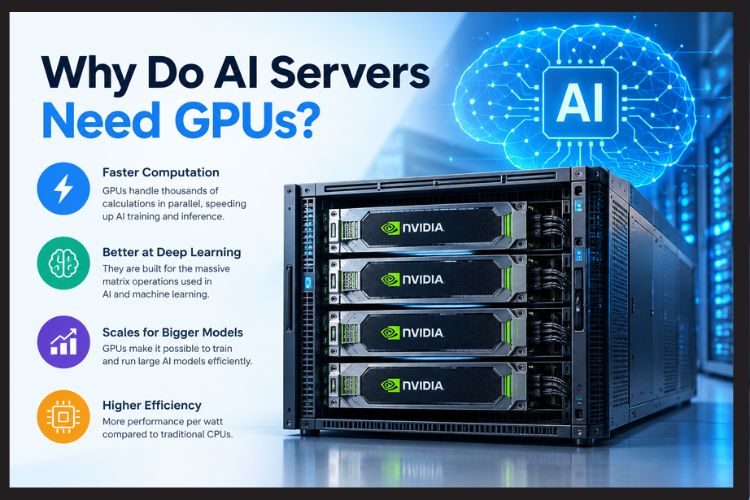
Why Do AI Servers Need GPUs?
Modern AI models require enormous amounts of mathematical computation.
CPUs are designed for general-purpose computing and are excellent at handling different types of tasks. GPUs contain many processing cores that can execute large numbers of similar calculations in parallel.
This makes GPUs particularly effective for:
- Matrix multiplication
- Tensor operations
- Neural-network training
- Large-scale inference
- Computer vision
- Transformer-based models
However, simply adding a powerful GPU does not automatically create an effective AI server.
The CPU, RAM, PCIe configuration, storage, networking, power supply, and cooling system must also support the GPU.
What Are the Best Servers With GPU for AI Training?
The best server for AI training depends on your model size, GPU memory requirements, dataset size, training duration, and budget.
A suitable AI training server should have the following:
High-VRAM GPUs
GPU memory is one of the most important specifications for AI workloads.
Large models need enough VRAM to hold model parameters, activations, and other data during training.
When comparing GPUs, consider:
- VRAM capacity
- Memory bandwidth
- Tensor performance
- GPU interconnect
- Power requirements
- Software compatibility
Powerful CPU
The CPU prepares data and feeds workloads to the GPUs.
A weak CPU can become a bottleneck when processing large datasets, running preprocessing pipelines, managing multiple GPUs, or handling several workloads simultaneously.
Sufficient System RAM
System RAM supports dataset loading, preprocessing, caching, and other applications running alongside AI workloads.
The required capacity depends on your dataset and application architecture.
Fast NVMe Storage
AI applications can process very large datasets. Slow storage can leave expensive GPUs waiting for data.
High-speed NVMe storage is useful for:
- Training datasets
- Model checkpoints
- Temporary files
- Development environments
Reliable Power and Cooling
Multiple GPUs can consume substantial power and generate significant heat.
The server chassis, power supply, fans, airflow, and data-center environment should all be designed for the selected GPU configuration.

What's the Best GPU Server for AI Workloads?
There is no single best GPU server for every AI application.
The right configuration depends on whether you are training models, running inference, developing generative AI applications, or processing computer-vision workloads.
For AI model training
Prioritize:
- High VRAM
- High memory bandwidth
- Multi-GPU scalability
- Powerful CPU
- Adequate RAM
- Fast NVMe storage
For AI inference
Prioritize:
- GPU inference performance
- Sufficient VRAM
- Low latency
- Power efficiency
- Network performance
- Concurrent-user capacity
For large language models
VRAM becomes especially important because larger models can require substantial GPU memory.
For multi-GPU systems, GPU-to-GPU communication and interconnect architecture should also be considered.
What is the Best GPU for an AI Server?
There is no universal “best GPU.”
For demanding enterprise AI and HPC workloads, NVIDIA data-center GPUs such as the H100 and A100 are established options. However, they are not automatically the best choice for every organization.
Before choosing a GPU, evaluate:
- VRAM
- Compute performance
- Memory bandwidth
- Tensor performance
- GPU interconnect
- Power consumption
- Software ecosystem
- Availability
- Total cost of ownership
For smaller workloads, a less expensive GPU may deliver better value than purchasing the most powerful accelerator available.
Best practice: Define the workload first and select the GPU based on those requirements rather than starting with a GPU model.
Key Features to Consider Before Buying an AI or GPU Server?
GPU memory
If your model cannot fit comfortably into available VRAM, you may need:
- A GPU with more VRAM
- Multiple GPUs
- Model quantization
- CPU offloading
- Distributed training
PCIe architecture
Multi-GPU servers require adequate PCIe lanes and a motherboard designed to support the required GPU configuration.
Poor PCIe planning can limit the performance of expensive GPUs.
GPU-to-GPU communication
Multi-GPU workloads can involve substantial communication between accelerators.
Depending on the GPU and platform, technologies such as NVLink or other high-speed interconnects can improve communication efficiency.
Networking
Networking becomes increasingly important when multiple GPU servers work together.
A high-speed network can help distribute workloads and transfer data between nodes efficiently.
Storage
Fast NVMe storage is generally preferred for active AI datasets and workloads that require high storage performance.
Larger deployments may also require shared or distributed storage.
Benefits of AI and GPU Servers
Faster AI workloads
GPU acceleration can significantly reduce the time required for computationally intensive AI tasks.
Better inference performance
GPU-based inference can process many operations in parallel, making it suitable for demanding production applications.
Multi-GPU scalability
A properly designed server can accommodate multiple GPUs for larger workloads.
Greater data control
Organizations handling sensitive information may prefer on-premises AI infrastructure because it provides greater control over data and computing resources.
Infrastructure flexibility
Organizations can configure hardware according to their specific AI, HPC, or GPU-computing requirements.
Cloud vs On-Premises GPU Servers
Before you buy server hardware, compare on-premises infrastructure with cloud GPU services.
Cloud GPU infrastructure
Cloud infrastructure can be useful when:
- GPU demand changes frequently
- You need GPUs temporarily
- You want rapid deployment
- You do not want to maintain physical hardware
On-premises GPU infrastructure
On-premises servers may make more sense when:
- GPUs will run continuously
- You handle sensitive data
- You already have data-center infrastructure
- You need predictable long-term capacity
- Multiple internal teams will share the infrastructure
The correct choice depends on GPU utilization, electricity, cooling, maintenance, hardware depreciation, staffing, and cloud usage, not simply the purchase price.
What Would You Deploy First: Two On-Premises GPU Servers?
For organizations starting a small AI cluster, two GPU servers can be a practical architecture.
A simple setup could look like:
GPU Server 1 → AI workloads
GPU Server 2 → AI workloads
Both servers can connect to:
- High-speed network switch
- Shared storage
- Management network
- Corporate network
This configuration can provide better workload separation and room for expansion.
However, two servers are not automatically faster than one powerful server. If your application requires GPUs to communicate frequently, a single multi-GPU server may provide better performance.
The architecture should therefore be based on how your AI application scales.
Can You Build a GPU Server at Home With NVIDIA H100 or A100 GPUs?
Technically, yes, but it is generally not practical for a typical home environment.
Enterprise GPUs such as the NVIDIA H100 and A100 are designed for demanding data-center workloads.
Before considering a home installation, evaluate:
- Electrical capacity
- Power consumption
- Cooling
- Server chassis compatibility
- Noise
- Physical space
- GPU availability
- Operating costs
For serious AI development, a professionally designed server or data-center environment is usually more practical.
How to Build a Small-Scale GPU Server?
If you are building your first GPU server, define the workload before purchasing components.
Answer these questions first:
- What AI models will you run?
- How much VRAM do they require?
- Will you train models or only perform inference?
- How many users will access the system?
- How many GPUs do you need?
- How large are your datasets?
- Will you need shared storage?
- Will the server run 24/7?
- What power and cooling infrastructure is available?
- What is your total budget?
This approach reduces the risk of purchasing expensive hardware that does not match your actual workload.
How Much Does a GPU Server Cost in India?
GPU server prices in India vary significantly by GPU model, VRAM, CPU, RAM, storage, chassis, networking, warranty, and configuration.
A basic GPU server can cost considerably less than a high-end multi-GPU AI system.
Enterprise AI servers equipped with multiple high-end data-center GPUs can cost several lakhs or substantially more depending on configuration.
When comparing GPU server cost in India, look beyond the initial hardware price.
Consider the complete cost of ownership:
- Server hardware
- GPUs
- RAM
- NVMe storage
- Networking
- Electricity
- Cooling
- Maintenance
- Warranty
- Replacement components
The same approach should be used when evaluating AI server price in India.
The cheapest server is not necessarily the most cost-effective server.
How to Build an On-Prem GPU Cluster?
A small on-premises GPU cluster generally contains multiple GPU servers connected through a high-speed network.
A simplified architecture looks like this:
Corporate Network
↓
High-Speed Network Switch
↙ ↘
GPU Server 1 GPU Server 2
↓ ↓
GPU + CPU + RAM + NVMe
A production environment may additionally require:
- Shared or distributed storage
- Containerization
- Job scheduling
- Monitoring
- Authentication
- Backup
- Network security
- Cluster management
The software and networking layers are just as important as the physical GPU hardware.
Common Mistakes When Buying an AI or GPU Server
Choosing the most expensive GPU
The most powerful GPU is not always the best-value option.
Ignoring VRAM
A GPU can have excellent compute performance but still be unsuitable if your model does not fit into its memory.
Underestimating power and cooling
High-end GPUs can significantly increase electricity and cooling requirements.
Buying insufficient RAM
Large datasets and preprocessing workloads can require substantial system memory.
Ignoring networking
Networking becomes critical when multiple servers or GPUs need to exchange large amounts of data.
Focusing only on purchase price
Always consider total cost of ownership, including electricity, cooling, maintenance, and future upgrades.
How to Choose the Right Server
Use this simple framework:
Choose a GPU server when:
- You need GPU acceleration for AI, HPC, rendering, or other workloads.
- You want a flexible platform for different applications.
- You may change workloads over time.
Choose an AI-optimized server when:
- AI is your primary workload.
- You need multiple high-performance GPUs.
- You require optimized CPU, memory, storage, networking, and cooling.
- You expect to run AI workloads continuously.
Choose a multi-server GPU cluster when:
- One server cannot provide enough compute capacity.
- You need workload distribution.
- You need additional capacity as your organization grows.
- You are building an internal AI platform.
Key Takeaways
- AI Server vs GPU Server is primarily a distinction between workload-focused infrastructure and GPU-focused hardware.
- A GPU server can support AI, HPC, rendering, and other GPU-accelerated applications.
- An AI server is designed around the specific requirements of AI workloads.
- GPU VRAM is one of the most important specifications for AI.
- CPU, RAM, NVMe storage, PCIe lanes, networking, power, and cooling also affect performance.
- H100 and A100 GPUs are powerful enterprise options, but they are not automatically the right choice for every project.
- Two on-premises GPU servers can provide a practical starting point for a small AI cluster.
- GPU server price in India depends heavily on the complete hardware configuration.
- Total cost of ownership is more useful than comparing hardware prices alone.
- Define your workload before you buy AI servers or other GPU infrastructure.
Conclusion
Understanding AI Server vs GPU Server becomes much easier when you focus on the workload rather than the terminology.
A GPU server provides hardware acceleration for demanding computational workloads, while an AI server takes a broader approach by optimizing GPUs, CPU, memory, storage, networking, cooling, and software for artificial intelligence.
If you plan to train AI models, deploy generative AI applications, run large-scale inference, or build an on-premises GPU cluster, the right architecture can significantly affect performance and long-term costs.
Before you buy server hardware, identify your model size, VRAM requirements, expected workload, number of users, scalability requirements, and budget.
Serverstack can help you evaluate server configurations for AI, GPU, machine learning, HPC, and on-premises infrastructure. The goal should not be to buy the most powerful hardware, but to build a system that delivers the right performance, scalability, reliability, and value for your workload.
Frequently Asked Questions
1. What is the difference between an AI server and a GPU server?
An AI server is designed and optimized for artificial intelligence workloads, while a GPU server is a broader hardware category containing one or more GPUs. Many AI servers are GPU servers, but GPU servers can also be used for rendering, scientific computing, and other workloads.
2. What is the best GPU server for AI workloads?
There is no single best GPU server for every workload. The right choice depends on GPU memory, model size, training or inference requirements, number of GPUs, CPU, RAM, storage, networking, and budget.
3. What should I consider before buying an AI server?
Consider GPU VRAM, GPU performance, CPU capability, system RAM, NVMe storage, PCIe connectivity, networking, power, cooling, software compatibility, warranty, and future scalability. Most importantly, make sure the configuration matches your workload.
4. How much does a GPU server cost in India?
The GPU server cost in India varies significantly according to the GPU, VRAM, CPU, RAM, storage, networking, chassis, and warranty. Basic systems can cost considerably less than enterprise multi-GPU servers, which may cost several lakhs or more.
5. Can I build a GPU server at home with an NVIDIA H100 or A100?
It is technically possible, but these data-center GPUs require careful consideration of power, cooling, chassis compatibility, noise, electricity costs, and physical infrastructure. A professional server or data-center environment is generally more practical.
6. How do I build an on-premises GPU cluster?
A basic cluster can start with two GPU servers connected through a high-speed network switch. Larger deployments may require shared storage, cluster management, workload scheduling, monitoring, authentication, backup, and network security.