Table of Contents
Building a server in India is easier than ever, but choosing the best server hardware without overspending can be challenging. Whether you need a server for your business, website hosting, data storage, software development, or a home lab, the first step is understanding your requirements and setting a realistic budget.
A server does not always need to be expensive. A small home server can handle file sharing, backups, and basic applications, while a business server may require enterprise-grade processors, ECC memory, redundant power supplies, and advanced storage options.
In this guide, we will explain how to build a server, estimate the server build cost in India, understand the server setup cost in India, and select hardware that provides good performance without unnecessary expenses.
What is a Server Build?
A server build is the process of selecting compatible hardware, assembling the components, installing an operating system, and configuring the machine to perform specific tasks.
Unlike a standard desktop computer, a server is designed to provide services to other computers or users. Depending on its configuration, it can host websites, store business files, run virtual machines, manage databases, or support AI and machine learning workloads.
Before starting a server build, decide what you want the machine to do. This decision affects the processor, memory, storage capacity, networking hardware, cooling, and overall cost.
For example, a small business running internal applications may need a different configuration from a company hosting several websites or training AI models.
How Much Does It Cost to Build a Server in India?
The cost of building a server in India depends on its intended workload, hardware specifications, and whether you choose new or refurbished components.
The following figures are illustrative budget estimates, not fixed market quotations. Actual prices vary by brand, generation, configuration, warranty, GST, and availability.
Server type | Estimated hardware budget |
Basic home server | ₹80,000–₹90,000 |
Home lab or development server | ₹2,00,000–₹3,00,000 |
| Enterprise-level server | ₹3,50,000–₹4,50,000 |
Custom virtualization server | ₹1,50,000–₹4,00,000 |
High-capacity storage server | ₹1,50,000–₹6,00,000 |
GPU or AI server | ₹4,50,000–₹10,00,000+ |
These ranges are planning estimates and overlap because different workloads require different components. A high-capacity storage server, for instance, may cost more than a general-purpose server even if its processor is less powerful. Multi-GPU systems can exceed the listed range significantly.
For a more accurate estimate, compare current configurations and request a quote based on your required specifications. Published Indian server listings also show substantial price differences between refurbished enterprise hardware and new custom-built systems.
1. Define Your Server Requirements Before Buying Hardware
The most common mistake when building a server is purchasing expensive hardware before identifying the actual workload.
Start by answering these questions:
- How many users will access the server?
- Will it run continuously, 24 hours a day?
- How much storage do you need now, and how much will you need in the future?
- Will you host websites, databases, business applications, or virtual machines?
- Do you need a dedicated GPU for AI, rendering, or machine learning?
- Will the server be installed at home, in an office, or in a data centre?
Your answers will help determine the appropriate hardware configuration.
For example, a small office running file sharing and accounting software may work well with a modest processor, 32GB of RAM, and SSD storage. A virtualization server running multiple operating systems simultaneously may require 128GB of RAM or more.
Choosing components based on real requirements is one of the simplest ways to control the server build cost in India.
2. Choose the Right Server Processor
The processor is one of the most important components in a server because it affects computing performance, virtualization capacity, and application responsiveness.
For a basic home server, a modern desktop-class processor may be sufficient. For demanding business workloads, an Intel Xeon or AMD EPYC platform may provide features and expansion capabilities better suited to the job.
Consider these factors when selecting a processor:
- Core count: More cores can help when running several applications or virtual machines simultaneously.
- Clock speed: Important for applications that depend heavily on single-core performance.
- Memory support: Check the supported RAM capacity, memory type, and ECC compatibility.
- Expansion options: Ensure the platform supports the storage controllers, network cards, and GPUs you require.
- Power consumption: A processor that meets your performance requirements without excessive power consumption can reduce long-term operating costs.
Do not choose a processor simply because it has the highest core count. A balanced system that matches your workload can provide better value than an unnecessarily powerful configuration.
3. Select the Right Amount of RAM
RAM determines how much active data and how many applications your server can handle comfortably.
For a simple home server, 8GB to 16GB may be enough for lightweight tasks, depending on the operating system and applications. A more flexible home lab might benefit from 32GB to 64GB, while virtualization, databases, and business applications can require 64GB, 128GB, or considerably more.
Consider ECC memory when reliability and data integrity are important. However, ECC support depends on the processor, motherboard, and memory configuration; it should not be assumed to work with every system.
When calculating your server build cost, consider both your immediate requirements and future expansion. Installing additional RAM later can be economical, provided the motherboard has available slots and supports the required modules.
4. Choose SSD or HDD Storage
Storage affects system responsiveness, capacity, reliability, and cost.
An SSD is generally a good choice for the operating system, frequently accessed applications, and databases. HDDs can offer a lower cost per terabyte for backups, archives, and large media collections.
A practical server may use both technologies:
- NVMe SSD: For fast application access, databases, and virtual machine storage.
- SATA SSD: For general-purpose applications and operating system installation.
- Enterprise HDD: For high-capacity storage and backup repositories.
- RAID or redundant storage: To improve availability or protect against certain drive failures, depending on the configuration.
Remember that RAID is not a replacement for backups. Accidental deletion, ransomware, software errors, and other incidents can still affect data stored in a redundant array.
When planning storage, estimate your usable capacity rather than simply adding up the capacity printed on every drive. RAID configuration and formatting can reduce available space.
5. Select a Server Case, Motherboard, and Power Supply
Your motherboard, chassis, and power supply must support all the components in your server build.
A tower server is often suitable for a home office or small business because it is relatively easy to install and maintain. A rack server is a better fit when you need rack-mounted equipment, greater expansion options, or multiple servers in a dedicated rack.
Check the following before purchasing:
- Motherboard compatibility with the selected processor and memory.
- Available PCIe slots for network cards, storage controllers, or GPUs.
- Number and type of supported drive bays.
- Power supply capacity and connector compatibility.
- Cooling requirements and airflow.
- Physical dimensions and noise levels.
- Availability of spare parts and warranty support.
For a server that handles important business operations, consider redundant power supplies if the selected platform supports them. They can reduce downtime from a single power supply failure, though they don’t eliminate every possible source of downtime.
6. Estimate the Server Build Cost Component by Component
A component-level budget helps you understand where your money will go and where you can save.
The basic business server with moderate processing requirements. Depending on our requirements.
Component | Example budget |
Processor | ₹16,000 |
Compatible motherboard | ₹30,000 |
32GB RAM | ₹10,000 |
SSD storage | ₹10,000 |
Server case | ₹8,000 |
Power supply and cooling | ₹7,000 |
Networking and accessories | ₹4,000 |
Estimated hardware total | ₹85,000 |
These are sample allocations for budgeting, not verified live component prices. This configuration is not a guaranteed enterprise-grade server, and the final cost depends on the selected platform, component compatibility, market situation, and availability.
A business that requires ECC memory, redundant power supplies, hot-swappable drives, enterprise management features, or a hardware RAID controller may need a higher budget.
Also account for operating system licensing, assembly, installation, UPS equipment, networking, taxes, and warranty coverage when estimating the complete project cost.
7. Calculate the Server Setup Cost in India
Buying server hardware is only one part of the total investment. You must also consider the cost of installation, configuration, security, and ongoing operation.
The server setup cost in India depends on whether you install the system yourself or hire a professional to configure it.
Common setup expenses include:
- Hardware assembly and compatibility testing.
- Operating system installation.
- Network configuration and remote access.
- Storage configuration and backup scheduling.
- Security updates and access controls.
- UPS installation and power protection.
- Application installation and testing.
- Monitoring and maintenance.
For budgeting purposes, you could reserve a few thousand rupees for a simple self-managed setup or a larger amount for professional installation and business-grade configuration. Complex migrations, virtualization, security hardening, and high-availability deployments may require a separate project quotation.
The best approach is to request an itemized estimate that separates hardware, installation, software licensing, and recurring support costs.
8. How to Build a Server at Home?
A home server is useful for personal file storage, media libraries, development projects, automated backups, and learning server administration.
You do not necessarily need enterprise hardware to get started.
Follow these steps:
Step 1: Decide the purpose. Determine whether you need network storage, a media server, a development environment, or a home lab for virtual machines.
Step 2: Choose compatible hardware. Select a processor, motherboard, RAM, storage, case, and power supply that match your workload.
Step 3: Assemble and test the components. Confirm that the machine starts correctly, detects all memory and drives, and operates within safe temperatures.
Step 4: Install an operating system. Linux distributions are popular for home servers. Windows Server may be appropriate when your applications require its specific features and licensing.
Step 5: Configure storage and networking. Set up user accounts, shared folders, network access, and scheduled backups.
Step 6: Secure remote access. Install updates, use strong passwords, apply least-privilege access, and use a VPN or another secure access method where appropriate. Avoid exposing administration interfaces directly to the public internet.
Step 7: Monitor performance. Check CPU usage, memory consumption, disk health, temperatures, and backup completion.
A home server can be an economical starting point, but remember to include electricity costs. A machine running continuously can consume considerably more power than a low-power mini PC or NAS device.
9. Custom Server Build India: New vs. Refurbished Hardwar
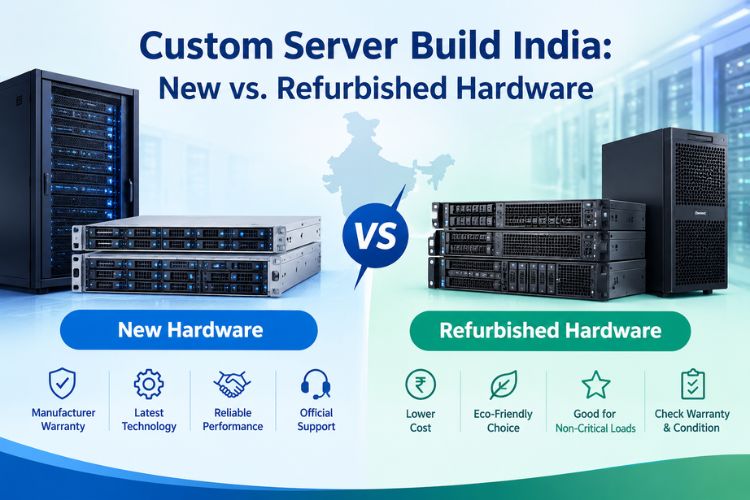
When planning a custom server build in India, you generally have three options: purchase a new branded server, build a custom system from compatible components, or buy refurbished enterprise hardware.
New branded server
A new branded server is worth considering when you need manufacturer support, documented compatibility, warranty coverage, and predictable maintenance.
It may cost more upfront, but the support arrangement can be valuable for critical business applications.
Custom-built server
A custom build lets you select the processor, RAM, storage, networking, and chassis according to your requirements. It can be a practical choice when standard configurations include features you do not need or do not provide enough flexibility.
Make sure the builder validates component compatibility, tests the completed machine, and explains the warranty terms.
Refurbished enterprise server
Refurbished equipment can provide a lower purchase price and access to enterprise features. However, check the processor generation, drive condition, memory compatibility, power consumption, spare-part availability, and warranty before buying.
Older enterprise servers may also consume more electricity or produce more noise than newer hardware.
Your decision should consider the total cost of ownership, not just the initial server price.
10. Compare Server Price in India Before Purchasing
Searching for a server price in India can produce a wide range of results because vendors may list different generations, memory capacities, storage options, and warranty terms.
Before comparing quotations, make sure the configurations are equivalent.
What to compare | Why it matters |
Processor model | Determines performance and platform capabilities |
RAM capacity and type | Affects workload capacity and compatibility |
Storage configuration | Determines speed, usable capacity, and redundancy |
Network connectivity | Important for file transfers and business applications |
Power supplies | Affects power protection and redundancy |
Warranty | Influences repair costs and downtime risk |
Installation | Clarifies whether configuration is included |
GST and delivery | Helps calculate the final payable amount |
A useful servers price list should specify the exact model, processor, memory, storage, warranty, and applicable taxes. A price without these details may not be sufficient for an accurate comparison.
If you are planning a custom configuration, ask the supplier to provide separate prices for the base server, optional upgrades, and installation services.
11. Server Build Online: How to Choose a Configuration
A server build online tool or configuration service can simplify hardware selection by letting you choose components and request a quotation.
This can be particularly useful when you need a custom server for virtualization, storage, web hosting, or AI workloads.
When using an online configurator, follow these guidelines:
- Select the workload or application first.
- Choose a compatible processor and motherboard platform.
- Add sufficient RAM for your expected workload.
- Select the required storage capacity and redundancy.
- Confirm support for network cards and GPUs.
- Review the power supply and cooling requirements.
- Compare the final price, warranty, and support options.
Do not assume that every combination shown online is automatically suitable for your workload. Ask the vendor to confirm compatibility and provide a complete configuration before placing your order.
You can also review available custom server configurations and pricing as a starting point for comparing hardware options.
12. Calculate the Long-Term Cost of Running a Server?
A server’s purchase price does not represent its entire lifetime cost. Electricity, cooling, maintenance, replacement drives, and support can add up over several years.
For example, assume a server consumes an average of 200 watts and runs continuously.
The estimated energy consumption is:
200 watts × 24 hours × 30 days = 144 kWh per month.
At an illustrative electricity rate of ₹10 per kWh, the server would consume approximately ₹1,440 worth of electricity per month, excluding additional cooling costs and any applicable fixed charges.
Actual consumption depends on hardware utilization, power management, workload, and cooling requirements. Use measured power consumption and your actual electricity tariff for a more accurate estimate.
You should also budget for periodic maintenance, replacement drives, backups, and potential upgrades. A server with a lower initial price may become more expensive over time if it uses excessive power or requires frequent repairs.
13. Common Mistakes to Avoid When Building a Server?

Avoid these common mistakes to protect your investment:
- Buying excessive hardware: Do not pay for CPU cores, RAM, or GPUs that your applications will not use.
- Ignoring compatibility: Check motherboard, processor, memory, storage, and power supply requirements.
- Using inadequate backups: Maintain separate backups and periodically test restoration.
- Underestimating power consumption: Calculate operating costs before selecting high-power hardware.
- Ignoring security: Apply updates, restrict access, and monitor system activity.
- Overlooking future expansion: Leave room for additional memory, storage, or networking when needed.
- Choosing solely by price: Compare warranty, reliability, support, and total cost of ownership.
A well-planned server build should balance performance, reliability, operating expenses, and future requirements.
Conclusion
Building a server in India does not require the most expensive hardware. It requires a clear understanding of your workload, careful component selection, and a realistic budget that includes installation and ongoing operation.
Whether you want to learn how to build a server at home, configure a business system, or plan a custom server build in India, start with the applications you need to run and select hardware accordingly.
Compare the server price list carefully, check compatibility, and calculate the complete server setup cost in India before making a decision. For business-critical workloads, consider warranty coverage, professional configuration, data protection, and long-term support alongside the initial purchase price.
The right server is not necessarily the most powerful one. It is the one that delivers the performance and reliability you need at a sustainable cost.
Frequently Asked Questions
1. How much does it cost to build a server in India?
The cost depends on the workload and hardware configuration. A basic home server may fit a budget of ₹85,000–₹1,50,000, while a business or virtualization server can cost ₹80,000 to several lakhs. These are indicative planning estimates, not fixed quotations.
2. How much is the server setup cost in India?
The server setup cost depends on assembly, operating system installation, network configuration, security, backup setup, and application requirements. Simple installations may cost a few thousand rupees, while complex business deployments require a customized quotation.
3. Can I build a server online?
Yes. Online server configurators and custom hardware providers can help you select components, compare configurations, and request quotations. Always verify component compatibility and the final specification before ordering.
4. What is the difference between a home server and a business server?
A home server usually handles personal storage, backups, media, or development. A business server may require greater processing capacity, ECC memory, redundant power, advanced storage, stronger access controls, and professional support.