
Table of Contents
As a company grows, there will be increasing demands on its IT infrastructure. Traditional server environments can be difficult to manage due to the high number of components needed, which take up lots of rack space and require individual power, cooling, and maintenance. This is effectively overcome by using rack servers.
Rack servers make it easier to manage your computing resources. They give you an easy-to-manage, scalable solution for your business. They are ideal for your IT business, data center, cloud service provider, web hosting company, or large enterprise. With the use of rack servers from industry leaders such as ASUS, Intel, and Penguin, you can build infrastructure to meet your workload and storage requirements, plus support growth.
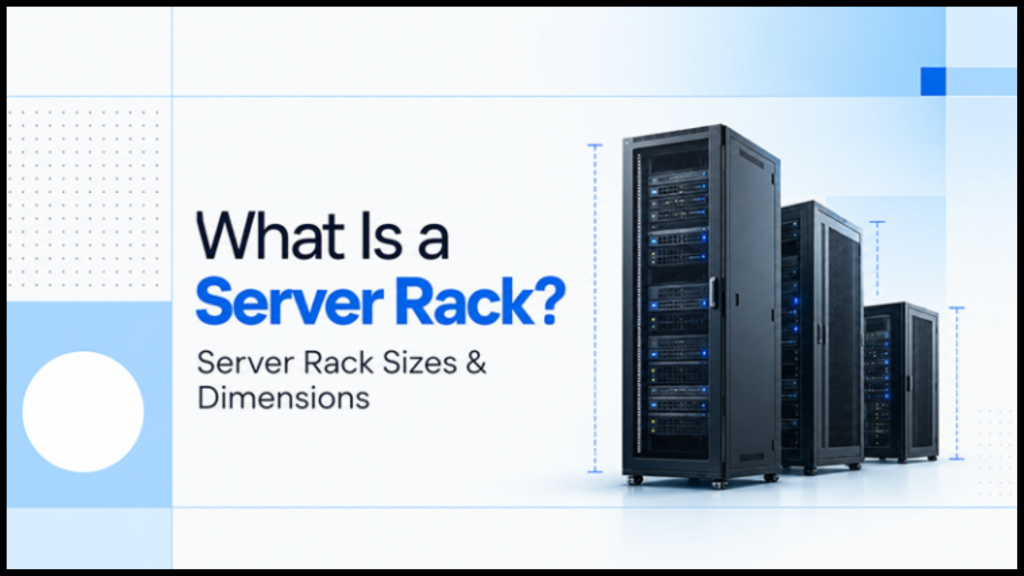
A server rack is a metal frame or cabinet that holds servers, switches, storage, patch panels, and other IT equipment. Rack-mounted servers are designed to fit into racks and enable multiple systems to be neatly stacked. Servers that are mounted inside a server rack. This will be where your applications, databases, websites, and business software will be hosted. Used to store business data, backup information, and application data.
Power Distribution Units (PDUs) provide power to your devices in your rack. Help with cooling and cable management. This means that a web hosting company can add several servers to one rack. This will allow them to host different customer websites. As opposed to having many individual machines around the office, they can have a central point of management.
How Can Rack Servers Benefit My Business?
There is a range of benefits associated with using rack servers within your business.
1. Save Space in Offices and Data Centers
One of the major benefits of using rack servers is how much space they save. Having multiple rack-mount systems means you can fit them all into one cabinet, allowing you to make the best use of the floor space in your business. This is especially useful in data centers and hosting providers that have many servers.Practical example: A cloud service provider can install several servers in a rack instead of using individual tower servers across a room. This creates a more organized environment and leaves space for additional equipment.
2. Thermal management and airflow
The servers themselves will produce some heat. If this isn’t managed correctly, it can cause issues with your equipment such as thermal throttling, poor performance, and unexpected shutdowns. Using the correct cabinet, blanking, and cabling, along with a good data center cooling strategy, can help to manage the airflow within the server racks. Things to consider are Keep an eye on the air temperature at the server air intakes. Don’t block airflow. Don’t block any of the air vents. Work out the amount of heat your kit will output.Use a suitable cooling solution to dissipate the overall rack heat. Planning how much cooling is required is important.
3. Easy Server Management
As your infrastructure grows, managing multiple standalone servers can become complicated. However, using rack-mounted servers makes it easier to manage each system. Labeling, cable management, power monitoring, and central management make it easy for technicians to identify each server. Many enterprise rack servers offer remote management features, which can be used by the IT department to monitor how healthy the server is, see any hardware alerts, and perform some administrative tasks. This can be a huge advantage to IT services and 24/7 data centers.
4. Support Business Growth and Scalability
As your business grows, you may need more computing power. Having rack-based infrastructure means there is a structured way to scale your business. You can scale your business by adding new compatible servers, storage, and network infrastructure, depending on how much rack space you have available and how much power, cooling, and networking you have. Growing Hosting Business As your business grows, you’ll begin with a few servers and add further infrastructure, which could be very useful for cloud providers to scale compute, storage, and networking within their environment. Consider rack space, power, networking, and cooling.
5. Provide reliable performance
Rack servers can be deployed for a range of business workloads, such as virtualization, databases, enterprise applications, cloud hosting, and bulk data processing. You have flexibility in what components you use. As an example, there are many different workloads that can be fulfilled using Intel-based platforms. ASUS provides servers and infrastructure solutions. Penguin offers specialist solutions and platforms. Selecting the right solution for your workloads that will be compatible and have the correct software license.
6. Better security and organization of equipment
A well-set-up rack system can help increase the security of your IT equipment. Using lockable cabinets, restricted-access server rooms, and monitoring can reduce physical access to the equipment. Better organization of your server rack makes it easier to identify what equipment you have and find out what is connected where. However, having a server rack system in place doesn’t secure your business data. Ensure your business has strong physical security with access control, network segmentation, encryption, and regular patching. Backups should be tried and true.
7) Manage long-term infrastructure costs
Using rack servers can help reduce space, cooling, power, and technician costs for your business. It will allow you to have standardized hardware setups and upgrade planning. The cost savings will depend on how much you utilize your servers, how much electricity you pay, how well you are cooling your servers, how much maintenance you have, and what your workloads are. A rack-based solution may not always be cheaper than other solutions, so you should consider the overall cost of ownership of your infrastructure. What industries are best suited to rack servers? If you need an organized and scalable computing infrastructure, then rack servers are a good solution. IT companies can use rack servers for software development, testing environments, virtualization, internal applications, and customer workloads. Data center server racks are used within data centers to store computing resources along with networking, power, and cooling units. High-density setups need to be carefully planned. Cloud Service Providers’ rack servers can be used by cloud providers to host virtual machines, containers, databases, and hosted applications. By monitoring resources and spreading the workload efficiently, you can make sure that your infrastructure is being used efficiently. Web Hosting Companies Web hosting companies use rack servers to host websites, databases, and email, along with business applications. Choosing the Right Rack Server
There is more than just the processor to consider. When choosing your rack server, consider the following:
1. What are you going to be using it for
Are you going to be running websites, databases, virtual machines, enterprise apps, or high-compute
2. Choose the right CPU and memory.
Ensure you have the right processor platform and memory (RAM). Virtualization and databases will often require more memory resources than basic file-serving applications.
3. Plan Storage Requirements
When choosing between an SSD and an HDD, there are several factors that should be taken into consideration. These include performance, capacity, reliability, and cost. RAID is another thing that should be considered, but it should not be used as a replacement for backups.
4. Rack Size
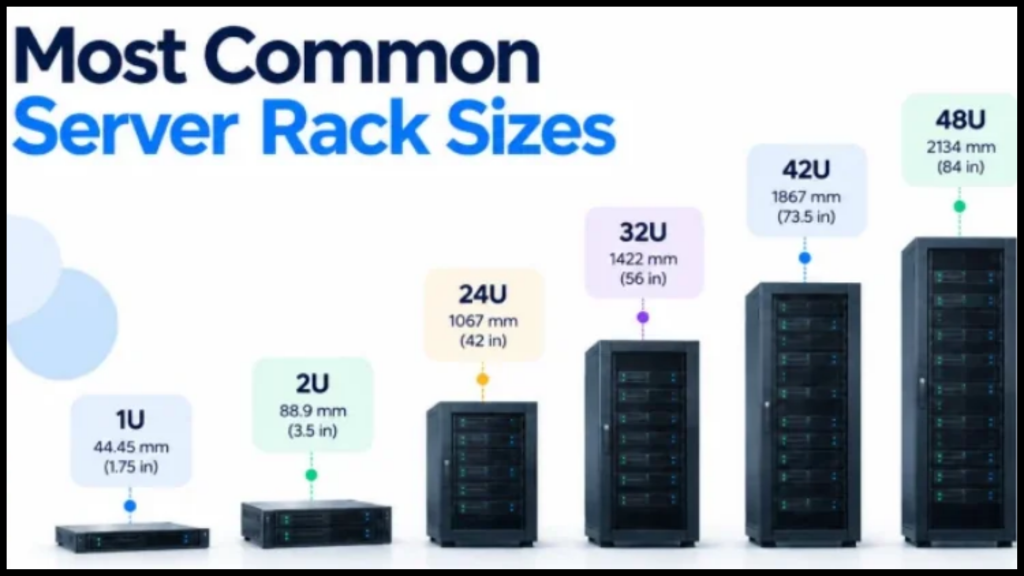
Many rack units come in Rack Units (U). A rack unit is 1.75 inches (44.45 mm). So a 2U server would take double the rack space of a 1U server. Check how deep your rack is, what type of rails you have, the weight capacity, and the wiring.
5. Power and Cooling
Calculate the amount of power your workload will consume and the amount of power available to it. Take into account any extra power redundancy required for providing a high-availability workload.
6. Warranty and Support
What warranty do they have? How easy is it to get replacement equipment? How easily can you get parts, and what support do they offer? This may affect the amount you pay to keep your equipment running and how long it will be out of action.
Rack servers are often a better fit for organizations operating multiple systems. Tower servers may be more appropriate for small businesses.
Frequently Ask Questions
1. What is a server rack?
A rack can give your server and IT a great structure. More space can be provided along with cabling, good airflow, power, and easy access.
2. How can rack servers allow for increased scalability?
There are more resources available to improve your business’s computing, storage, and networking capabilities. As there is a well-designed rack, there is more power available along with cooling and networking, which will make scaling your business easier.
3. Can rack servers be used by small businesses?
Yes, they can. They are ideal if you need some centralized services such as applications, virtualization, or file storage, and multiple services. But if you have limited workloads, then a tower server or cloud service might be a cheaper option.
4. How many servers can I fit into my server rack?
This depends on the height of the rack, the size of the server, and the maximum weight capacity of your rack. Plus, what power and cooling do you have available? A 42U rack would allow you to fit 21 2U servers. But this may vary depending on what else is in your rack.
5. Are rack servers better than tower servers?
It depends. Rack servers will usually be better for having multiple systems in an organized IT setup. However, they could be more easily used in a small office scenario.
6. Which brands should you look at?
ASUS, Intel-based, and Penguin are all good choices for rack servers. Take into account the processor speed, RAM, storage, management, warranty, and technical support offered.
7. Considerations when purchasing a rack server
When looking to buy a rack server, you will need to look at several factors. When choosing the right rack server spec, you will want to look at processing, RAM, storage, networking, rack, power, cooling, remote management, warranty & scalability.
8. What should you take into consideration when purchasing a rack server?
When choosing the right rack server spec, you will want to look at processing, RAM, storage, networking, rack, power, cooling, remote management, warranty & scalability.
Conclusion
Rack servers are essential to help you create an organized, scalable, and easily manageable IT infrastructure. They will help save space, make maintenance easier, scale your business, organize any equipment you have, and provide computing power for intensive workloads. Selecting the right server configuration is key when it comes to ensuring IT companies, data centers, cloud service providers, web hosting companies, and large enterprises get the best performance and reliability for the long term. There are many brands and platforms available, including ASUS, Intel, and Penguin. Before any investment in a rack server, consider what workload you will have, how much power and cooling you have, storage requirements, rack compatibility, and support. By planning your server rack, you will create a strong base for your business in the future.
Add Your Heading Text Here
Lorem ipsum dolor sit amet, consectetur adipiscing elit. Ut elit tellus, luctus nec ullamcorper mattis, pulvinar dapibus leo.


