
Table of Contents
Choosing the right server infrastructure is one of the most important decisions for any business. Whether you’re running a website, hosting business applications, managing databases, or building a private cloud, understanding Physical Servers vs. Virtual Machines can save you money, improve performance, and simplify future growth.
Many businesses struggle to decide between investing in a physical server or deploying virtual machines in a cloud or virtualization environment. While both options provide computing power, they differ significantly in cost, performance, scalability, security, and maintenance.
In this comprehensive guide, we’ll explain everything you need to know about Physical Servers vs. Virtual Machines, compare their strengths and weaknesses, discuss the physical server cost in India, and help you determine which solution best fits your business. If you’re planning to buy physical server hardware or move to virtualization, this guide from Serverstack will help you make an informed decision.
What is a Physical Server?
A physical server is a dedicated hardware machine designed to run applications, databases, websites, storage, or enterprise workloads. It includes its own processor (CPU), RAM, storage, network interfaces, and operating system.
Contact us
Unlike virtual environments, the hardware resources belong entirely to one server without sharing them with multiple virtual machines.
Physical Server Components
- Processor (Intel Xeon or AMD EPYC)
- ECC Memory
- Enterprise SSD or HDD Storage
- RAID Controller
- Power Supply
- Network Interface Cards
- Operating System
Their Common Uses
- Database hosting
- Enterprise applications
- ERP systems
- Large websites
- AI workloads
- Video rendering
- Backup servers
What is a Virtual Machine?
A Virtual Machine (VM) is a software-based computer that runs inside a physical server using virtualization software called a hypervisor.
Instead of using dedicated hardware, multiple VMs share the resources of one physical server.
Popular hypervisors include:
- VMware ESXi
- Microsoft Hyper-V
- Proxmox VE
- KVM
- Xen
Each VM behaves like an independent computer with its own:
- Operating System
- CPU allocation
- RAM
- Storage
- Applications
Physical Servers vs. Virtual Machines: Quick Comparison
Feature | Physical Server | Virtual Machine |
Hardware | Dedicated | Shared |
Performance | Excellent | Good to Excellent |
Scalability | Limited by hardware | Easy |
Deployment | Hours or Days | Minutes |
Isolation | Complete | Logical |
Cost | Higher upfront | Lower initial cost |
Maintenance | Hardware required | Easier |
Flexibility | Lower | Very High |
Resource Sharing | No | Yes |
Disaster Recovery | More complex | Easier |
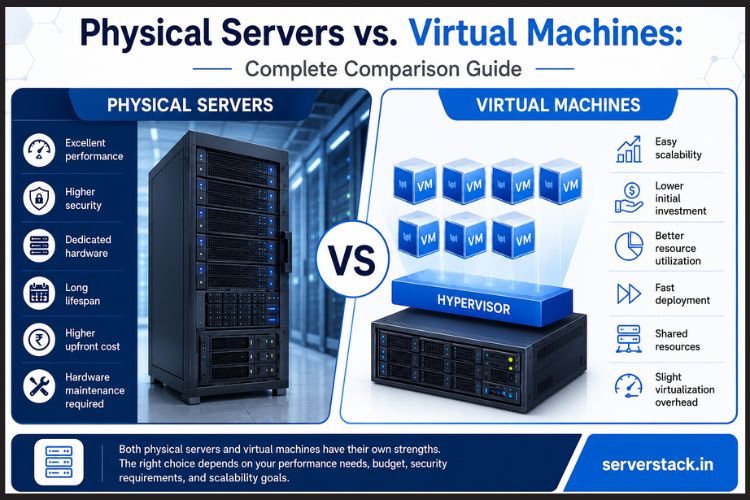
Physical Servers vs. Virtual Machines: Complete Comparison Guide?
1. Performance
Performance is one of the biggest differences.
A physical server uses dedicated hardware resources, meaning there is no competition for CPU, RAM, or storage.
Virtual machines share hardware resources, so performance depends on how many VMs are running simultaneously.
Physical Server Wins When:
- Running large databases
- AI processing
- High-frequency transactions
- Enterprise ERP
- Video rendering
Virtual Machine Wins When:
- Hosting multiple websites
- Development environments
- Testing
- Small business applications
2. Cost Comparison
The physical server cost in India depends on hardware specifications.
Typical price ranges include:
Server Type | Approximate Price |
Entry-Level | ₹50,000–₹80,000 |
Mid-Range | ₹80,000–₹2,00,000 |
Enterprise | ₹2,00,000–₹10,00,000+ |
Additional costs include:
- Rack space
- UPS
- Cooling
- Maintenance
- Hardware replacement
- Software licenses
Virtual machines usually require lower initial investment because one physical server can host multiple VMs.
3. Scalability
One major advantage of virtualization is scalability.
Adding more RAM or CPU to a VM often takes only a few clicks.
With physical servers, upgrading usually requires:
- Purchasing new hardware
- Installing components
- Downtime
4. Security
Dedicated hardware naturally offers better isolation.
Physical servers reduce the risks associated with noisy neighbors and shared infrastructure.
Virtual machines are also secure when properly configured but depend on:
- Hypervisor security
- Proper VM isolation
- Regular updates
5. Reliability
A hardware failure affects:
Physical Server
Only that server.
Virtual Environment
Multiple virtual machines if hosted on the same physical hardware.
However, enterprise virtualization platforms provide:
- High Availability (HA)
- Live Migration
- Automatic Failover
These features significantly improve uptime.
6. Resource Utilization
Many businesses use only 20–30% of a physical server’s capacity.
Virtualization increases hardware utilization by allowing multiple VMs to share resources efficiently.
This reduces wasted computing power.
What is the difference between Cloud vs Physical Server?
The debate around cloud vs physical server continues as organizations modernize their infrastructure.
Cloud Server | Physical Server |
Subscription pricing | One-time hardware investment |
Highly scalable | Limited by hardware |
Quick deployment | Longer setup time |
Internet dependent | Full local control |
Shared infrastructure | Dedicated hardware |
Lower initial investment | Higher upfront cost |
Choose Cloud When:
- Starting a business
- Seasonal traffic
- Remote workforce
- Fast deployment
Choose Physical Server When:
- Maximum performance is required
- Sensitive data must remain on-premises
- Compliance requirements exist
- Long-term workloads justify hardware ownership
What are the Advantages of Physical Servers?
Maximum Performance
No shared resources.
Better Security
Dedicated infrastructure reduces exposure.
Full Hardware Control
Customize every component.
Long-Term Cost Savings
For consistent workloads, owning hardware may cost less over several years than recurring cloud fees.
Best for Enterprise Applications
Perfect for:
- Oracle
- SAP
- SQL Server
- VMware clusters
What are Advantages of Virtual Machines?
Better Resource Utilization
Run multiple workloads efficiently.
Easy Backup
Snapshot technology simplifies recovery.
Fast Deployment
Create new servers within minutes.
Lower Initial Cost
No need to purchase dedicated hardware for every application.
Flexible
Scale resources as business needs change.
When Should You Buy a Physical Server?
You should buy physical server hardware if your organization:
- Runs mission-critical applications
- Requires maximum uptime
- Needs dedicated hardware
- Processes large databases
- Has strict compliance requirements
- Uses GPU-intensive applications
- Wants predictable performance
When Should You Choose Virtual Machines?
Virtual machines are best if you:
- Host multiple websites
- Develop software
- Need testing environments
- Frequently scale workloads
- Want lower infrastructure costs
- Require rapid deployment
Real-World Example
Imagine an e-commerce company handling over one million monthly visitors.
Web Server
Runs inside virtual machines.
Reason:
Easy scaling during sales events.
Database Server
Runs on a physical server.
Reason:
Maximum disk performance and dedicated resources.
This hybrid approach combines the strengths of both technologies.
Best Features Comparison between Physical Server vs Virtual Machine ?
Physical Server Features
- Dedicated CPU
- Dedicated RAM
- Enterprise storage
- Hardware RAID
- High security
- Better database performance
- Custom hardware upgrades
Virtual Machine Features
- Snapshot backup
- Live migration
- Resource allocation
- High Availability
- Fast provisioning
- Lower operational costs
- Better hardware utilization
Which One Performs Better?
For raw computing performance, physical servers almost always outperform virtual machines because applications have direct access to hardware without virtualization overhead.
However, modern virtualization platforms have reduced overhead significantly. In many business workloads, the performance difference is minimal, often under 5% making virtual machines a practical choice for web hosting, application servers, and development environments. The best option depends on your workload, performance requirements, and budget.
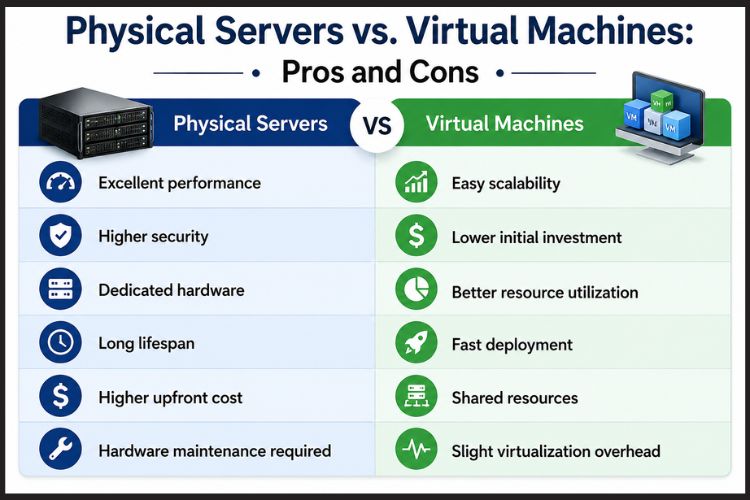
Physical Servers vs. Virtual Machines: Pros and Cons
Best Server Choice for Small Businesses
Small businesses usually benefit more from virtual machines because they:
- Cost less initially
- Scale easily
- Require less maintenance
- Simplify disaster recovery
- Support business growth
However, businesses with intensive workloads or compliance requirements may still benefit from dedicated physical servers.
Conclusion
Understanding the differences between Physical Servers vs. Virtual Machines is essential before making an infrastructure investment. Physical servers offer unmatched performance, dedicated resources, enhanced security, and complete hardware control, making them best for demanding enterprise workloads. Virtual machines, on the other hand, provide excellent flexibility, rapid deployment, and cost efficiency for businesses that need scalability and efficient resource utilization.
Rather than choosing one over the other, many organizations benefit from a hybrid strategy that combines dedicated physical servers for critical applications with virtual machines for web hosting, development, testing, and scalable services. Evaluating your workload, budget, growth plans, and compliance requirements will help you select the right solution for long-term success.
Looking for reliable enterprise-grade server solutions? Serverstack offers high-performance physical servers, virtualization-ready hardware, expert consultation, and tailored infrastructure solutions for businesses of all sizes. Whether you’re planning to buy physical server hardware or build a scalable hybrid environment, Serverstack can help you choose the right infrastructure to maximize performance, reliability, and long-term value.
Frequently Asked Questions
1. What is the main difference between Physical Servers vs. Virtual Machines?
A physical server is dedicated hardware used by a single operating system, while a virtual machine is a software-based server that shares hardware resources with other VMs through a hypervisor.
2. Are physical servers faster than virtual machines?
Yes. Physical servers generally provide higher performance because applications access hardware directly without virtualization overhead.
3. What is the physical server cost in India?
Entry-level physical servers typically start around ₹50,000 to ₹80,000, while enterprise-grade servers can range from ₹2,00,000 to over ₹10,00,000 depending on CPU, memory, storage, redundancy, and networking requirements.
4. Should I buy a physical server for my business?
You should consider buying a physical server if your business requires dedicated resources, high-performance databases, strict security, regulatory compliance, or predictable workloads that justify owning hardware.
5. Which is better: cloud vs physical server?
Cloud servers are best for flexibility, quick deployment, and scalability. Physical servers are better for dedicated performance, complete control, and workloads with strict compliance or latency requirements.
6. Can virtual machines replace physical servers?
Not always. While virtual machines are suitable for many applications, workloads that demand maximum performance, direct hardware access, or specialized devices often perform better on physical servers.
7. Why do enterprises still use physical servers?
Large organizations rely on physical servers for critical databases, ERP systems, virtualization hosts, AI workloads, and applications that require consistent performance and dedicated hardware.
8. Can I run multiple virtual machines on one physical server?
Yes. A single physical server can host multiple virtual machines, provided it has sufficient CPU, memory, storage, and network resources. This improves hardware utilization and reduces infrastructure costs.